Frequently Asked Questions
- How do I change permissions of my directory or file?
Changing directory permissions:
# Open a terminal, sudo as root.
su
Password: locor00t
# chmod a+w <path of directory>
chmod a+w /data/production/rnd_pipeline/shots/001/001_0010/
Changing file permissions:
# Open a terminal, sudo as root.
su
Password: locor00t
# chmod a+w <path of file>
chmod a+w /data/production/rnd_pipeline/shots/001/001_0010/scene/layout/001_0010_v01.mb
Why do I not see any ftrack actions?
First check to see if your ftrack-connect application is running on your computer. You can check that here.
If ftrack-connect is running on your computer, then check to see the event server workstation is running and connected to the network.
If the computer is running, then check to see if the supervisor daemon is running on the machine. You can check this by running:
# Open a terminal and type
ssh root@192.168.0.153
Password: locor00t
# restart the supervisord service
service supervisord restart
exit
How do I check if a file exists on JHB/CPT file server?
I am in JHB, how do I check if a file exists in CPT? Open a terminal and run:
ssh server@192.168.2.5
Password: server
# all production file are located at /data/production/
# cd to change directory
# ll to list contents of a directory
cd /data/production/rnd_pipeline/shots/001/001_0010/
ll
# result
total 12
drwxr-xr-x 5 server server 4096 Oct 17 14:50 img
drwxr-xr-x 7 server server 4096 Jan 12 15:44 scene
drwxrwxr-x 7 server server 4096 Oct 20 10:33 shotAssets
ll /data/production/rnd_pipeline/shots/001/001_0010/scene/layout/001_0010_v01.mb
# result
-rw-rw-rw- 1 server server 102604 Oct 17 16:35 /data/production/rnd_pipeline/shots/001/001_0010/scene/layout/001_0010_v01.mb
exit
I am in CPT, how do I check if a file exists in JHB? Open a terminal and run:
ssh admin@192.168.0.153
Password: loco
# all production file are located at /data/production/
# cd to change directory
# ll to list contents of a directory
cd /data/production/rnd_pipeline/shots/001/001_0010/
ll
# result
total 12
drwxr-xr-x 5 server server 4096 Oct 17 14:50 img
drwxr-xr-x 7 server server 4096 Jan 12 15:44 scene
drwxrwxr-x 7 server server 4096 Oct 20 10:33 shotAssets
ll /data/production/rnd_pipeline/shots/001/001_0010/scene/layout/001_0010_v01.mb
# result
-rw-rw-rw- 1 server server 102604 Oct 17 16:35 /data/production/rnd_pipeline/shots/001/001_0010/scene/layout/001_0010_v01.mb
exit
- I can’t access HQueue, what do I do?
The hqueue web page can be accessed by going to http://192.168.0.153:5000 in your web browser. This page is slow and takes a while to load, but if takes exceptionally long or if you get a “Page Not Found” error, then you can restart the hqueue service by opening a terminal and typing the following commands:
ssh root@192.168.0.153
Password: locor00t
cd /opt/hqueue/scripts/
./hqserverd restart
exit
- What do I do if one of the clients is down on the hqueue page?
Go to the CLIENTS page in HQueue. This is at
Any client called ‘render’ is a render farm machine. If one of these clients is red, then it means that the client is unavailable. This happens if there is a disruption in the hqueue client process running on the render farm machine.

In this example, render20 is offline. We can bring it back online by ssh’ing to the machine. The IP address of the machine is written next to the name. In this case it is 192.168.0.230. Run the following commands:
ssh root@192.168.0.230
Password: locor00t
service hqclientd restart
# if for whatever reason, the above command doesn't run, then run the script directly
/home/admin/hqclient/hqclientd restart
# Result of both those commands will look like
Stopping HQ client process.
Starting HQ client process/

...successfully started the HQ client process.
exit
Once the service has started, you will notice the client go green on the hqueue client page.

- There is a task on ftrack, but I don’t have the corresponding folder or file on disk
This could be one of 2 reasons, either the task’s type was not selected correctly or it is a permissions issue. If a task’s type is wrong, first correct the type in Ftrack.
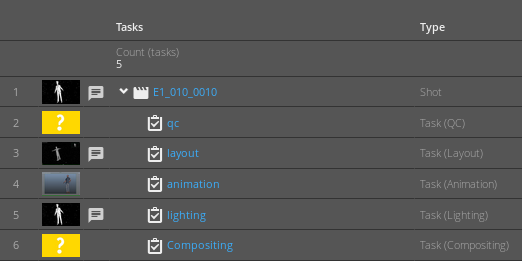
If it is a file permissions issue, first correct the directory permissions as described above. Then create a folder with the same name as the task in the shot structure. Copy the template file from
/data/production/<your_project>/template_files/<task_file>to your task folder. Rename the file to <shotname>_<version>.<ext eg. E1_010_0010_v01.mb
- The asset type is wrong on Ftrack, what do I do?
The asset type determines the asset folder on disk. So for asset Earth, if type is environment, then the asset will be created under
/data/production/<project>/assets/environment/EarthIf the asset type is prop, then the asset will be created under/data/production/<project>/assets/prop/Earth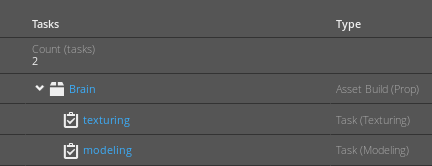
So if the asset type is wrong, your asset folder has been created incorrectly on disk. In such a situation, first change the asset type on ftrack. Then simply move the folder to the correct asset type folder.
Note
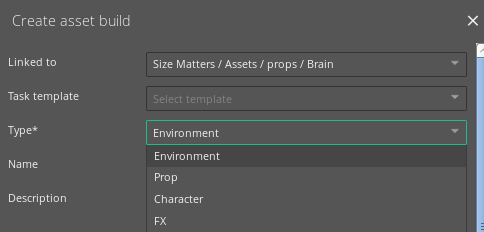
Asset types and task types are important as events are triggered based on the type. If the type is wrong, then a folder may be created in the wrong place on disk or the wrong template file may be copied over. So when creating a new task or asset, use the ‘Create’ menu in ftrack
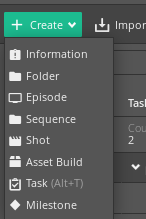
and make sure to select the correct type from the drop down menu.
How do I check how many Nuke licenses are in use?
In your browser go to http://192.168.0.208:4102/ Click on the ‘Status’ button in the column on the left. Then click on “foundry” under the “License Usage” column in the table.

Then in the page that opens, click “Get License Usage” button
This will display a table of all licenses currently in use for hiero, nuke and mari.
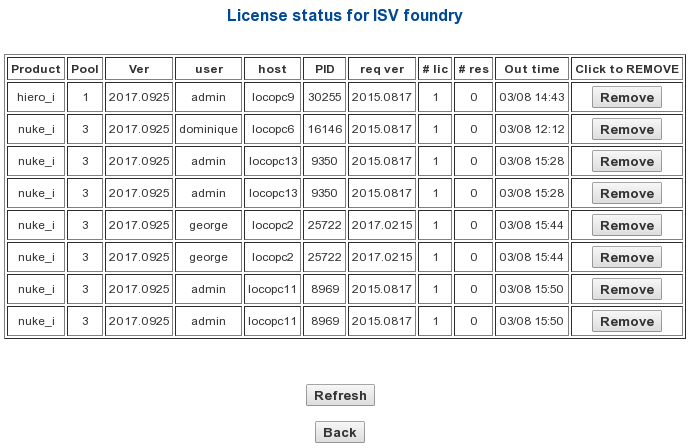
The host in the above table is the hostname of the computer. You can find out the hostname of your computer by going to System -> About this Computer.
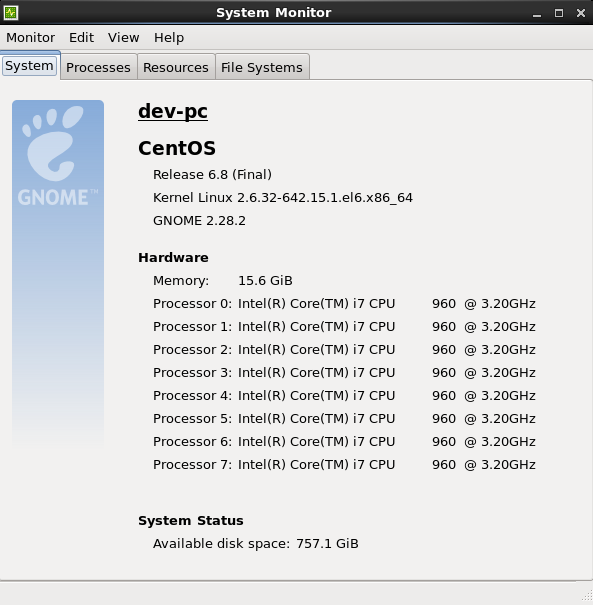
In this example, hostname is dev-pc